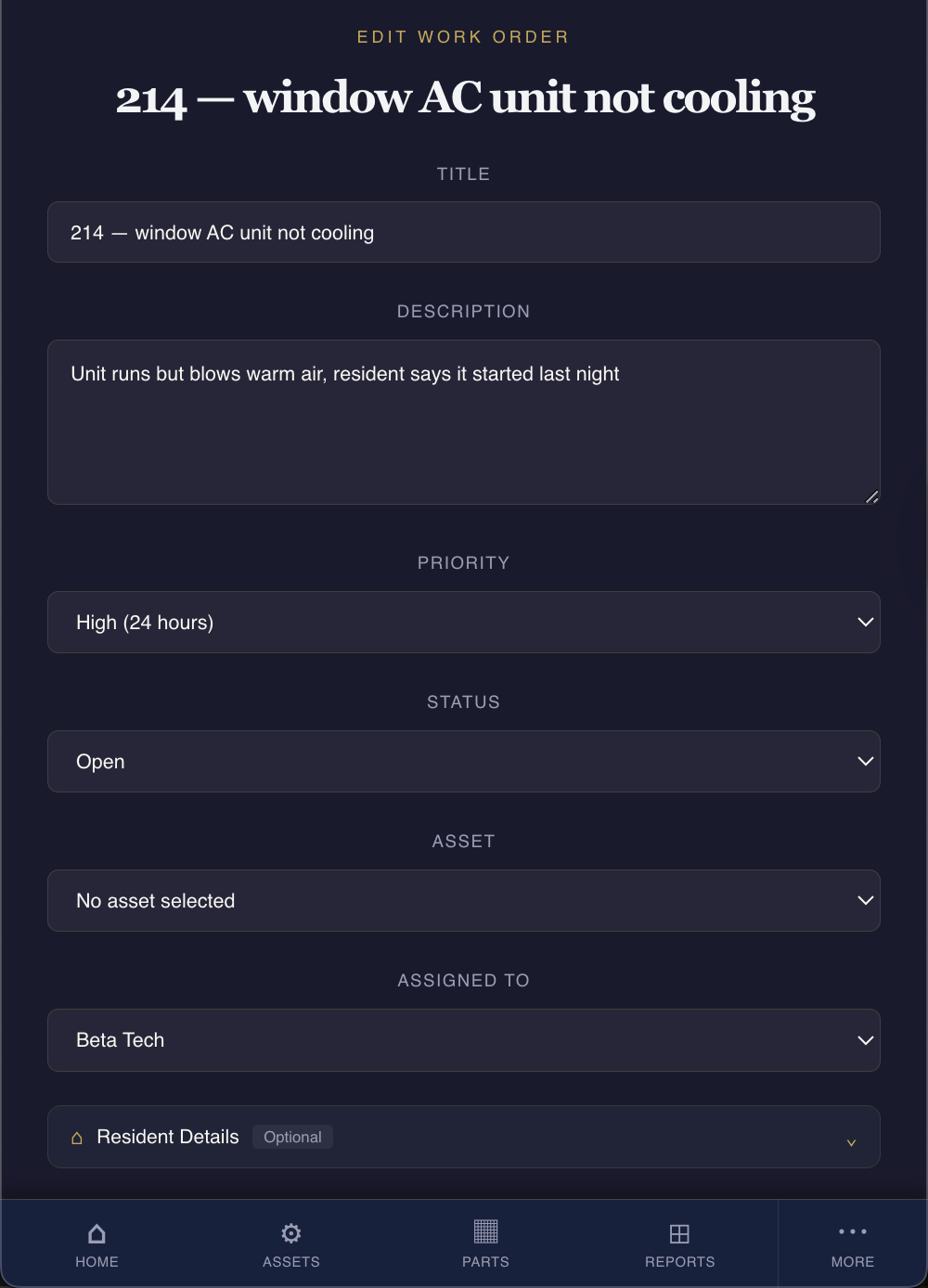
A request comes in and it says "AC in 214 not working." That is the whole thing. No name attached, no date, no note on whether the room is warm or the unit is dead silent, and no way to tell a week later who looked at it or what they found.
On a small team, that one line turns into a series of interruptions. Somebody has to track down who reported it. Somebody has to walk up to 214 to see what "not working" means. And when the resident's daughter calls Friday afternoon to ask why it is still eighty degrees in her mother's room, nobody can say what happened, because nothing was written down.
A good work order fixes that before it starts. It is not paperwork for its own sake. It is the difference between a task that gets done and closed out and a task that quietly slips through the cracks. Here is what belongs in one, and why each piece earns its place.
A clear title that says what and where
"AC in 214 not working" is a start, but a good title is specific enough to scan in a list of thirty open items and know exactly what it is. Something like "214 — window AC unit not cooling" tells you the room, the equipment, and the symptom in five words.
When a title is vague, every person who touches the work order has to open it, read the details, and reconstruct what it means. Multiply that across a full board of open work and you have a team spending its morning decoding its own list instead of working it.
The fields that matter
A work order does not need twenty fields. It needs the handful that answer the questions your team asks all day. Here is the short list.
Location or asset. Where is this, or which piece of equipment is it. A room number, a wing, a specific unit. On a small team everyone knows the building, but "the walk-in cooler in the west kitchen" removes any doubt, and it lets you look back later and see how many times that same cooler has needed attention.
A description of the actual problem. Write what someone observed, in plain terms. "Unit runs but blows warm air, resident says it started last night" is worth ten times more than "broken." The person who picks up the job should be able to grab the right parts before they walk up the stairs, instead of making the trip twice.
Priority. Not everything is an emergency, and not everything can wait. A resident with no cooling in August is not the same as a squeaky door hinge, and your team needs to see that at a glance. Three levels is usually enough: urgent, normal, low. What matters is that the label is on there so the right thing gets done first.
Who it is assigned to. A work order with no name on it belongs to nobody, which means it belongs to everybody, which means it waits. Put a specific person on it. If you reassign it later, that is fine, but at any moment one name should own it.
Status. Open, in progress, on hold, completed. This is the one field that tells you the state of your whole operation without asking a single person a question. A board where every item shows its status is a board you can run a shift from.
Dates. When it came in, and when it needs to be done. The open date gives you a clock. If a work order has been sitting for nine days, the date is what tells you, not your memory. A due date, even a rough one, keeps the low-priority items from aging into forgotten ones.
The part almost everyone skips
The fields above get a work order started. This next one is what makes it worth having at all, and it is the one small teams skip most often.
A closeout note and a completion record. When the job is done, write what was actually done, who did it, and when. "Replaced capacitor, unit cooling normally, confirmed 72 in room, closed 3:40 pm" takes fifteen seconds to write and answers every question anyone will ever ask about that job.
This is the record that pays off months later. When the same AC unit acts up again in October, the closeout note from July tells the next tech what was already tried. When a family member asks what was done and when, you have an answer with a name and a time on it. And when a state surveyor asks for proof that recurring work is happening, the closeout notes are the proof.
A work order without a closeout is a question that never got answered. It shows the problem but not the fix, so a month later nobody can tell whether it was ever really resolved or just fell quiet.
What this looks like in practice
Here is the same request, written two ways.
AC in 214 not working.
And here is the version that runs itself.
214 — window AC not cooling. Reported by day-shift aide, 7/17 8:15 am. Unit powers on, fan runs, air is warm. Resident in room, priority urgent. Assigned to Marcus. Status: in progress.
The second one never generates a single "hey, what's the deal with 214" conversation. Anyone who looks at it knows what it is, whose it is, how urgent it is, and where it stands. When Marcus finishes and adds his closeout note, the whole story is there for good.
You do not need software to start
None of this requires a system. You can put these fields on a paper form, a shared spreadsheet, or a whiteboard, and a disciplined team can run that way for a long time.
What tends to break is not the format. It is the upkeep. The paper form works until three techs keep three different notebooks. The spreadsheet works until half the team stops opening it. The whiteboard works until it gets erased on a busy Monday and last week's open items are simply gone. The structure is right; the problem is that keeping it current is one more job on a team that is already stretched.
That is the point where a tool built for this starts to earn its keep. The fields are already there, the closeout is built into finishing the job, and nothing gets erased. But the tool is secondary. The habit is what matters. A team that writes a real work order, with a real closeout, every single time is a team that stops losing track of its own work, whatever they write it on.
Work orders that hold their details
The Toolsmith gives your team a work order with every field that matters, assignments, priorities, status, and a completion record you can pull up months later. Built for small senior living communities. Start a free 14-day trial and see it on your own board.
Start Free Trial